728x90
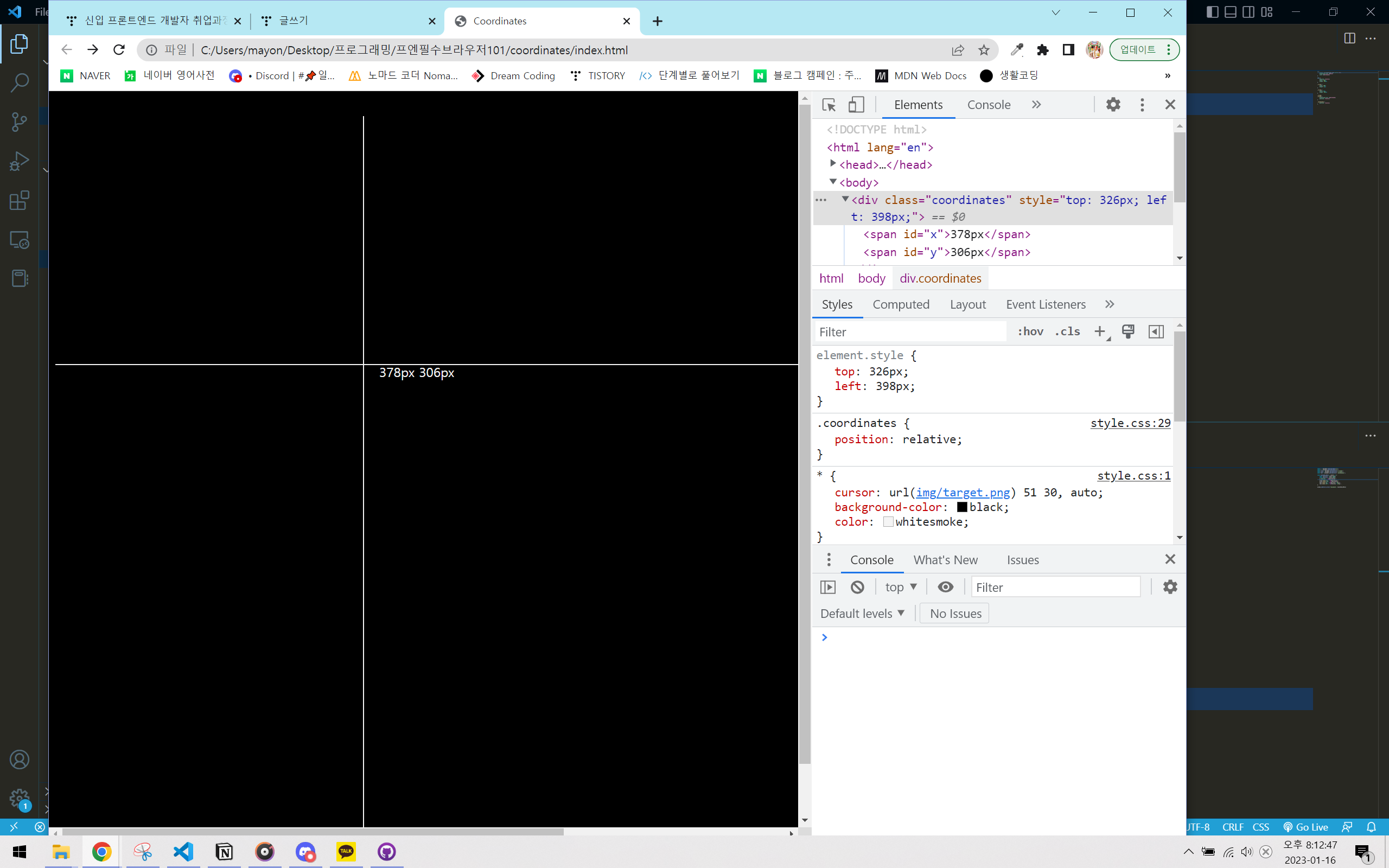
오랜만에 복습하니 많이 까먹었다.
그래도 검색해서 완성시킴!
1. 먼저 좌표 text, 라인(div) 생성
2. JS에서 addEventListener를 이용해 마우스가 움직이는 위치를 positionX, positionY 로 받아온 후
3. 이걸 line의 position에 (top, left ) 적용시킴.
4. 좌표에 innerText로 역시 pageX, pageY를 반영시킴.
5. 마우스의 위치 약간 아래(20px씩) 에 text 위치를 반영시킴.
5. text, line의 position은 모두 relative를 적용시킴.
HTML
<!DOCTYPE html>
<html lang="en">

<head>
  <meta charset="UTF-8" />
  <meta name="viewport" content="width=device-width, initial-scale=1.0" />
  <title>Coordinates</title>
  <script src="main.js" defer></script>
  <link rel="stylesheet" href="style.css" />
</head>

<body>
  <div class='coordinates'>
    <span id='x'>0px</span>
    <span id='y'>0px</span>
  </div>
  <div class='x-line'></div>
  <div class='y-line'></div>


</body>

</html>
css
* {
    cursor: url(img/target.png) 51 30, auto;
    background-color: black;
    color: whitesmoke;
}

body {
    position: relative;
    width: 100%;
    height: 100vh;
}

.x-line {
    width: 100%;
    height: 1px;
}

.y-line {
    width: 1px;
    height: 100vh;
}

.x-line,
.y-line {
    background-color: whitesmoke;
    position: relative;
}

.coordinates {
    position: relative;
}
JS
const x = document.getElementById("x");
const y = document.getElementById("y");
const xLine = document.querySelector(".x-line");
const yLine = document.querySelector(".y-line");
const text = document.querySelector(".coordinates");

const handleMouseMove = (event) => {
    const xPosition = event.pageX;
    const yPosition = event.pageY;
    x.innerText = `${xPosition}px`;
    y.innerText = `${yPosition}px`;
    xLine.style.top = `${yPosition}px`;
    yLine.style.left = `${xPosition}px`;
    text.style.top = `${yPosition + 20}px`;
    text.style.left = `${xPosition + 20}px`;
}

window.addEventListener("mousemove", handleMouseMove)
+ 강의에서 한 방법
: mouse의 이미지를 바꾸는게 아니라,
html 에서 img 태그로 마우스 이미지를 넣어준다.
position: absolute;
top: 50%;
left: 50%;
tranform: translate(-50%, -50%);
=> 정 가운데에서 이미지의 절반만큼 중앙으로 이동함.
728x90
반응형